
How do I move passwords, passkeys, and codes between Password Manager and Vault12 Guard?
With the latest Vault12 Guard release, easy password backup is no longer limited to just your cryptocurrencies and seed phrases. Now you can import Apple passwords and logins, verification codes, passkeys, and even Wi-Fi credentials from major third-party administrators (e.g. Bitwarden), store them in a decentralized Vault, and export them back to a compatible app if you need to move them or recover them later. It works on iPhone, iPad, and Mac running iOS 26, iPadOS 26, and macOS 26.
Vault12 Guard now supports Apple’s new Credential Exchange Protocol (CXP), making it much easier to import existing credentials into an inherited Vault. CXP is a new industry standard designed for the secure transfer of passkeys and passwords between compatible apps and platforms. So, instead of manually copying your details or recreating your account, you can safely go directly to Vault12 Guard.
With iOS 26, Apple is the first major platform to launch CXP, opening the door to true credential portability and user choice. Thanks to the integration, iPhone users now have a secure, standardized way to import password keys from other password managers and platforms into Vault12 Guard while keeping everything encrypted and under control.
Why does Vault12 Guard back up my credentials?
Once your credentials are imported into Vault12 Guard, they are protected like any other high-value asset.
- Decentralized Protection with Guardians
Your credentials are encrypted, partitioned, and stored throughout your network. Chosen Guardian (a trusted person or your own device), not a single cloud account or server. - Inheritable design
Via Vault12 digital inheritanceYour beneficiaries can recover important logins and keys using the same audit restoration flow already documented for other assets when your guardian approves the inheritance request. - No vendor lock-in
Vault12 Guard uses the same system-level transfer mechanism as major managers like Apple Password and Bitwarden, so you can always re-export your credentials to other apps later.
We recommend that you configure an active Guardian before importing to ensure that your credential backup is secure and recoverable.
What do I need to import passwords into Vault12 Guard?
- Vault12 Guard has been updated to the latest version in iOS 26 / iPadOS 26 / macOS 26.
- A password manager that supports the following new secure export flows:
- apple password
- Bitwarden
- Other compatible apps whose support will expand over time.
Note: The list of currently supported apps is limited, but will expand as more administrators adopt the same standard.
How are passwords transferred or sent to Vault12 Guard?
Apple’s Credential Exchange A feature in iOS 26, iPadOS 26, and macOS 26 introduces a standardized OS control scheme that allows credentialed apps to securely communicate with each other.
At a high level:
- Exports always start from the app that currently holds the data (Apple Passwords, Bitwarden, etc.).
Select options such as “Export data to another app” / “Move to another password app”. - Your system will display a list of compatible target apps (including Vault12 Guard).
- If you select Vault12 Guard, the OS will:
- Package your chosen credentials (login, passkey, verification code, and Wi-Fi details if supported).
- Send safely directly to Vault12 Guard,
- Enables reading only by selected target apps.
There is no manual juggling or regular file export in this flow, just a mediated, encrypted handoff by the operating system and participating apps.
Vault12 Guard connects to this mechanism as a safe backup and inheritance target (and export source) rather than developing your own incompatible format.
How do I import passwords into Vault12 Guard?
Use this feature to allow Vault12 Guard to act as a resilient backup for credentials stored elsewhere.
For iPhone, iPad, or Mac (same pattern):
- Open a password manager (e.g. Apple Passwords, Bitwarden).
- Select the items you want to protect in Vault12 Guard:
- Login, passkey, verification code, Wi-Fi credentials.
- Select “Export to another app” / “Move to another password app”.
- Select “Vault12 Guard” from the list of targets.
- Vault12 Guard opens:
- Shows what you’re importing.
- You can choose an asset name.
- Check everything and save it to Vault.
Select the Export option from Apple Password, select the credentials you want to export, and then select a destination.
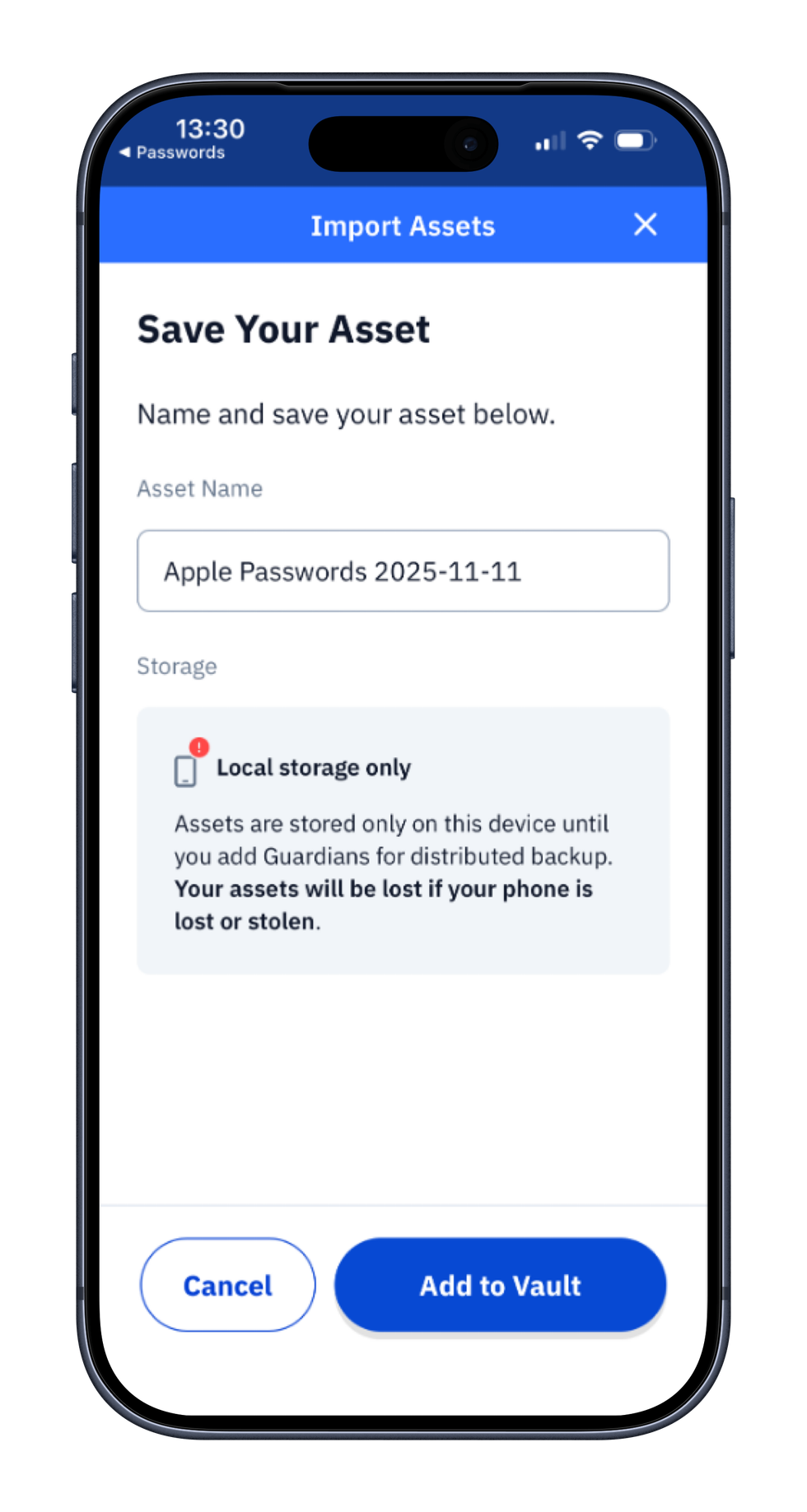
Once exported, open Vault12, name the credentials file and add it to the Inheritance Vault.
How do I export from Vault12 Guard to another app?
If your Vault is inherited and contains imported password files, you can export those files to a compatible password manager.
You can also use this feature when switching tools, rebuilding different managers, or verifying portability.
For iPhone, iPad, and Mac:
- Open Vault12 Guard.
- Go to the relevant asset details screen.
- Open the context menu (⋯).
- Tap “Export credentials to another app.”
- Choose a destination (e.g. Apple Passwords, Bitwarden, or another supported manager).
- Check the system prompt.
The OS passes those credentials directly to the app of your choice using the same secure channel, making Vault12 Guard an endpoint for import and a clean, standards-compliant source for export.
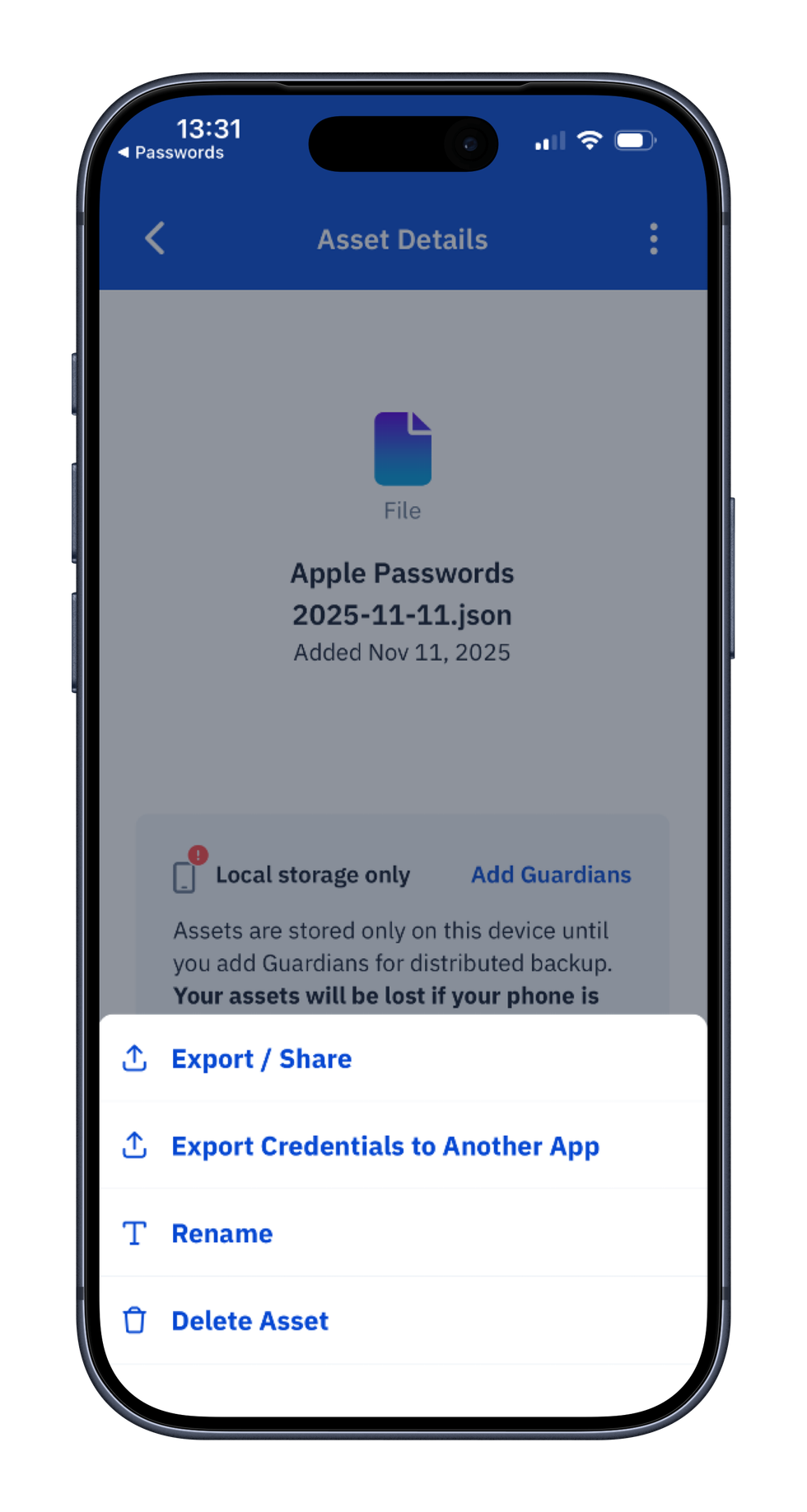
Export password file
What are the best practices for transferring credentials using Vault12 Guard?
- Import only from trusted devices protected by biometrics and device password.
- Keep Guardian active and up to date to avoid recovery issues in the future.
- Use Vault12 Guard as a neutral backup hub, not a replacement for routine auto-population. Let your password manager handle your logins. Vault12 Guard ensures long-term recoverability.
- Export only to trusted apps. The system dialog box indicates this explicitly. If you don’t recognize the app, don’t send your credentials to it.
1) AppleID/iCloud password and secret key are not backed up while exporting from Apple Password.
2) You must manually back up your password manager’s master password.