
Crypto Flexs
  • DIRECTORY
  • CRYPTO
    • ETHEREUM
    • BITCOIN
    • ALTCOIN
  • BLOCKCHAIN
  • EXCHANGE
  • TRADING
  • SUBMIT
Crypto Flexs
  • DIRECTORY
  • CRYPTO
    • ETHEREUM
    • BITCOIN
    • ALTCOIN
  • BLOCKCHAIN
  • EXCHANGE
  • TRADING
  • SUBMIT
Crypto Flexs
Home»BITCOIN NEWS»Introduction to right-click trading: place limit and stop orders directly from the price chart
BITCOIN NEWS

Introduction to right-click trading: place limit and stop orders directly from the price chart

By Crypto FlexsMarch 28, 20243 Mins Read
Facebook Twitter Pinterest LinkedIn Tumblr Email
Introduction to right-click trading: place limit and stop orders directly from the price chart
Share
Facebook Twitter LinkedIn Pinterest Email

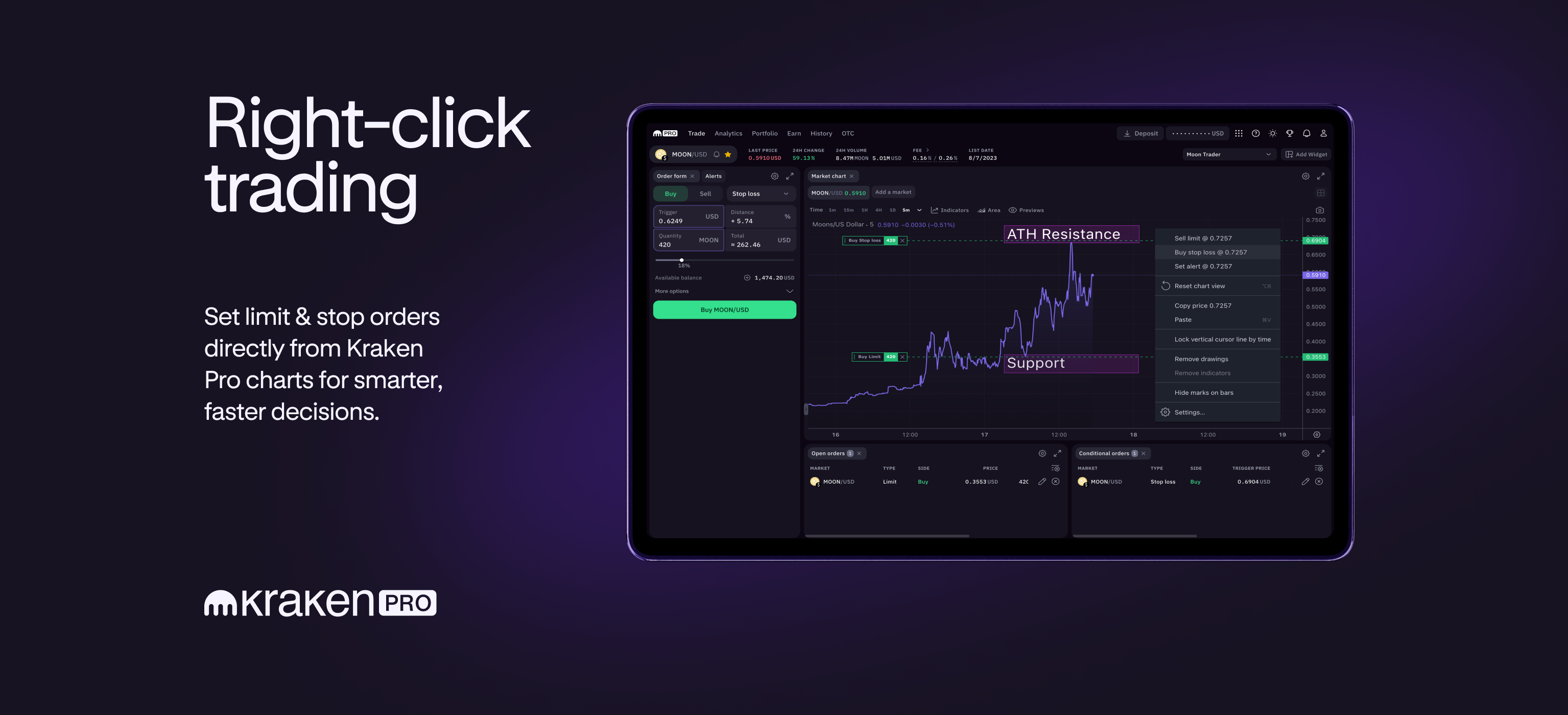
Cryptocurrency trading requires accuracy, speed, and strategic risk management. Kraken Pro’s new right-click feature allows customers to place limit and stop orders directly on cryptocurrency charts for more intuitive and less error-prone trading.

This upgrade aims to improve the trading process, allowing you to take immediate action based on chart analysis without having to navigate or manually enter detailed order information each time.

Why chart-based order placement is important

Setting limit and stop-loss orders directly on the chart makes it simple and accurate to avoid mistakes like accidentally selecting the wrong order type or buy/sell direction when manually entering order forms. By interacting directly with the chart, you can ensure that your orders accurately reflect your analysis and intentions.

Intuitive entry and exit

Right-click trading improves your ability to plan your trades by visualizing entry and exit points directly on the chart. With a simple right-click action, you can set: Sell ​​Limit or Buy Stop Loss higher than the current price Buy Limit or Sell Stop Loss Below that, you adjust your trading settings based on market analysis in real time.

Example scenario: MOON/USD

If traders believe that the MOON/USD pair is on the verge of hitting a new all-time high, they may choose to capitalize on this momentum. You can do this through strategic placement. Buy order limitr is the level of support stop buy order Slightly above the breakout price to capitalize on the expected uptrend.

For a practical demonstration of how to set up two types of orders on a chart using the new right-click feature, see the examples in the video below.

Turn on order form preview: Edit orders directly from the chart (drag and drop)

Take advantage of advanced features for informed trading

Kraken Pro’s right-click trading with limit and stop orders enhances your trading toolkit along with the ability to set price alerts directly from the charts. This integration not only simplifies the trading process, but also allows you to make quick, informed decisions, minimizing the risk of input errors and allowing you to continually adapt to market movements as they occur.

Explore a new dimension of intuitive trading with Kraken Pro and take full advantage of chart-based order placement and price alerts for an efficient and accurate trading strategy.

These materials are provided for general information purposes only and are not investment advice or a recommendation or solicitation to buy, sell, stake or hold any cryptocurrency or to engage in any particular trading strategy. Kraken does not and will not seek to increase or decrease the price of any particular cryptocurrency it offers. Some cryptocurrency products and markets are unregulated and you may not be protected by government compensation and/or regulatory protection schemes. The unpredictable nature of the cryptocurrency market may result in loss of funds. Taxes may be levied on the appreciation and/or reporting of your cryptocurrency assets and you should seek independent advice regarding your tax position. Geographic restrictions may apply.

Share. Facebook Twitter Pinterest LinkedIn Tumblr Email

Related Posts

Why Wall Street is starting to take prediction markets seriously

February 18, 2026

transaction – How to programmatically determine which Tx consumed an OutPoint

February 12, 2026

Slot drops $180,000 in one blink.

February 6, 2026
Add A Comment

Comments are closed.

Recent Posts

As privacy talk heats up, Dash integrates Zcash privacy pool.

February 22, 2026

Cardano (ADA) Bears Active — Token Risks Another Downside

February 21, 2026

Spot Bitcoin ​ETF records total net withdrawals of $3.8 billion over 5 weeks

February 21, 2026

Why the Unleash Protocol hack occurred due to governance failure

February 20, 2026

IP Strategy Announces Share Repurchase Program of Up to 1 Million Shares

February 20, 2026

Phemex Completes Full Integration Of Ondo Finance Tokenized Equity Suite

February 20, 2026

Unicity Labs Raises $3M To Scale Autonomous Agentic Marketplaces

February 19, 2026

Web3 Advertising Grows Up What Brands Will Demand In 2026

February 19, 2026

Are Sweeps Coins A Cryptocurrency Or Something Else?

February 19, 2026

XRP gains momentum as Arizona adds XRP to state cryptocurrency reserves.

February 19, 2026

Phemex Launches AI-Native Revolution, Signaling Full-Scale AI Transformation

February 19, 2026

Crypto Flexs is a Professional Cryptocurrency News Platform. Here we will provide you only interesting content, which you will like very much. We’re dedicated to providing you the best of Cryptocurrency. We hope you enjoy our Cryptocurrency News as much as we enjoy offering them to you.

Contact Us : Partner(@)Cryptoflexs.com

Top Insights

As privacy talk heats up, Dash integrates Zcash privacy pool.

February 22, 2026

Cardano (ADA) Bears Active — Token Risks Another Downside

February 21, 2026

Spot Bitcoin ​ETF records total net withdrawals of $3.8 billion over 5 weeks

February 21, 2026
Most Popular

Bitcoin price rises 5% to $62,000 as U.S. jobs data boosts interest rate cut bets

May 3, 2024

Devcon Update: Wave 2 Announcement, New Application Window, and More!

February 26, 2024

NFT sales drop 38% due to weakening cryptocurrency market

January 31, 2026
  • Home
  • About Us
  • Contact Us
  • Disclaimer
  • Privacy Policy
  • Terms and Conditions
© 2026 Crypto Flexs

Type above and press Enter to search. Press Esc to cancel.